TikTok Scraper
TikTok Scraper
TLDR
- Get TikTok video details with download URLs, user profiles, trending feeds, and search results — all via a simple REST API.
- 100 free queries per month.
Here's a sample response for video details:
{
  "video_id": "7577398554101058824",
  "region": "NP",
  "caption": "#fyp #foryoupage #shinchan #dontletthisflop #viral",
  "created_at": 1764250588,
  "duration_seconds": 11,
  "author": {
    "user_id": "7277886691518465026",
    "handle": "giaerra",
    "display_name": "gītaa^̲̲̲",
    "avatar_url": "https://p16-common-sign.tiktokcdn-us.com/..."
  },
  "media": {
    "video_url": "https://v19.tiktokcdn-us.com/.../video.mp4",
    "hd_video_url": "https://v16.tokcdn.com/.../video_hd.mp4",
    "file_size_bytes": 784387,
    "hd_file_size_bytes": 4552303
  },
  "audio": {
    "audio_id": "7468606643236883217",
    "title": "original sound - gwyneth.paita",
    "artist": "gwyn",
    "is_original": true
  },
  "stats": {
    "views": 2152606,
    "likes": 304735,
    "comments": 728,
    "shares": 60542,
    "downloads": 531,
    "saves": 22444
  }
}
What is this?
The TikTok Scraper API gives you real-time access to TikTok data.
Get video details with direct download URLs (including HD and watermark-free), pull user profiles with follower stats, browse trending feeds by region, fetch any user's video history, and search videos by keyword — all as clean, structured JSON.
Perfect for social media analytics, content research tools, influencer tracking, video downloaders, or any app that needs TikTok data.
▶️ Video Tutorial
Watch the complete API walkthrough:
Why use it?
1. Detailed Data with 100% Accuracy
Get complete TikTok data in real time. Every view count, every like, every video URL — pulled live. No stale caches, no guesswork.
Video metadata, direct MP4 download links (HD + watermark-free), author info, engagement stats, audio details, thumbnails — it's all there. 30+ data points per video.
2. Free Plan
100 queries per month. Free. No credit card required.
3. Affordable Pricing
When you need more, our paid plans cost less than alternatives:
- $16 gets you 3K queries/month
- $48 gets you 15K queries/month
- $148 gets you 75K queries/month
How to use it?
Simple REST API. Here's how it works:
- Create an account at omkar.cloud to get your API key.
It takes just 2 minutes to sign up. You get 100 free requests every month for detailed TikTok data.
This is a well built product, and your search for the best TikTok Scraper API ends right here.
- Make a request with it:
cURL:
curl -X GET "https://tiktok-scraper.omkar.cloud/tiktok/videos/details?video_url=https://www.tiktok.com/@giaerra/video/7577398554101058824" \
  -H "API-Key: YOUR_API_KEY"
Python:
import requests

api_key = "YOUR_API_KEY"

# Get video details with download URLs
response = requests.get(
    "https://tiktok-scraper.omkar.cloud/tiktok/videos/details",
    params={"video_url": "https://www.tiktok.com/@giaerra/video/7577398554101058824"},
    headers={"API-Key": api_key}
)
print(response.json())- Get structured TikTok data and use it.
That's it. URL to video data in milliseconds.
API Reference
Video Details
GET https://tiktok-scraper.omkar.cloud/tiktok/videos/details
video_url(required) — TikTok video URL.
Example:
import requests

response = requests.get(
    "https://tiktok-scraper.omkar.cloud/tiktok/videos/details",
    params={"video_url": "https://www.tiktok.com/@giaerra/video/7577398554101058824"},
    headers={"API-Key": "YOUR_API_KEY"}
)

print(response.json())
Sample Response:
{
  "video_id": "7577398554101058824",
  "region": "NP",
  "caption": "#fyp #foryoupage #shinchan #dontletthisflop #viral",
  "created_at": 1764250588,
  "duration_seconds": 11,
  "author": {
    "user_id": "7277886691518465026",
    "handle": "giaerra",
    "display_name": "gītaa^̲̲̲",
    "avatar_url": "https://p16-common-sign.tiktokcdn-us.com/..."
  },
  "media": {
    "video_url": "https://v19.tiktokcdn-us.com/.../video.mp4",
    "watermarked_video_url": "https://v19.tiktokcdn-us.com/.../video_wm.mp4",
    "hd_video_url": "https://v16.tokcdn.com/.../video_hd.mp4",
    "file_size_bytes": 784387,
    "watermarked_file_size_bytes": 0,
    "hd_file_size_bytes": 4552303
  },
  "thumbnails": {
    "cover_url": "https://p19-common-sign.tiktokcdn-us.com/.../cover.jpeg",
    "animated_cover_url": "https://p16-common-sign.tiktokcdn-us.com/.../animated.image",
    "original_cover_url": "https://p16-common-sign.tiktokcdn-us.com/.../original.webp"
  },
  "audio": {
    "audio_id": "7468606643236883217",
    "title": "original sound - gwyneth.paita",
    "artist": "gwyn",
    "play_url": "https://v16-ies-music.tiktokcdn-us.com/.../audio.mp3",
    "cover_url": "https://p16-common-sign.tiktokcdn-us.com/.../cover.jpeg",
    "is_original": true,
    "duration_seconds": 25,
    "album": null
  },
  "stats": {
    "views": 2152606,
    "likes": 304735,
    "comments": 728,
    "shares": 60542,
    "downloads": 531,
    "saves": 22444
  },
  "is_advertisement": false,
  "is_pinned": false
}
Trending Videos
GET https://tiktok-scraper.omkar.cloud/tiktok/videos/trending
market(optional, default:us) — Two-letter region code.max_results(optional, default:10) — Number of videos to return (max 20).
Example:
import requests

response = requests.get(
    "https://tiktok-scraper.omkar.cloud/tiktok/videos/trending",
    params={"market": "us", "max_results": 10},
    headers={"API-Key": "YOUR_API_KEY"}
)

print(response.json())
Sample Response:
{
  "videos": [
    {
      "video_id": "7603384680255081758",
      "region": "US",
      "caption": "Lives in 🇺🇸USA #singlelife",
      "created_at": 1770300964,
      "duration_seconds": 5,
      "author": {
        "user_id": "7586897697803846711",
        "handle": "leeou2011",
        "display_name": "lejack.k",
        "avatar_url": "https://p16-common-sign.tiktokcdn-us.com/..."
      },
      "media": {
        "video_url": "https://v45.tiktokcdn-us.com/.../video.mp4",
        "watermarked_video_url": "https://v45.tiktokcdn-us.com/.../video_wm.mp4",
        "hd_video_url": null,
        "file_size_bytes": 192786,
        "watermarked_file_size_bytes": 505111,
        "hd_file_size_bytes": null
      },
      "thumbnails": {
        "cover_url": "https://p16-common-sign.tiktokcdn-us.com/.../cover.jpeg",
        "animated_cover_url": "https://p16-common-sign.tiktokcdn-us.com/.../animated.image",
        "original_cover_url": "https://p19-common-sign.tiktokcdn-us.com/.../original.webp"
      },
      "audio": {
        "audio_id": "6774345467095451650",
        "title": "I Need Your Love",
        "artist": "Jake Coco & Madilyn Bailey",
        "is_original": false,
        "duration_seconds": 60,
        "album": "The Covers, Vol. 6"
      },
      "stats": {
        "views": 83370,
        "likes": 3289,
        "comments": 600,
        "shares": 20,
        "downloads": 44,
        "saves": null
      },
      "is_advertisement": false,
      "is_pinned": false
    }
  ]
}
User Profile
GET https://tiktok-scraper.omkar.cloud/tiktok/users/profile
handle(required) — TikTok username (without the@).
Example:
import requests

response = requests.get(
    "https://tiktok-scraper.omkar.cloud/tiktok/users/profile",
    params={"handle": "marvel"},
    headers={"API-Key": "YOUR_API_KEY"}
)

print(response.json())
Sample Response:
{
  "user": {
    "user_id": "6857582733233931270",
    "handle": "marvel",
    "display_name": "Marvel Entertainment",
    "bio": "Marvel social media manager",
    "avatar_thumbnail_url": "https://p19-common-sign.tiktokcdn-us.com/.../100x100.webp",
    "avatar_medium_url": "https://p16-common-sign.tiktokcdn-us.com/.../720x720.webp",
    "avatar_large_url": "https://p19-common-sign.tiktokcdn-us.com/.../1080x1080.webp",
    "is_verified": true,
    "is_private": false,
    "bio_link": "Marvel.com",
    "instagram_handle": null,
    "twitter_handle": null,
    "youtube_channel_title": null,
    "youtube_channel_id": null,
    "account_created_at": 1596655540
  },
  "stats": {
    "following_count": 0,
    "follower_count": 14969237,
    "total_likes": 207043170,
    "video_count": 1883
  }
}
User Videos
GET https://tiktok-scraper.omkar.cloud/tiktok/users/videos
handle(required) — TikTok username (without the@).max_results(optional, default:10) — Number of videos to return (max 30).page_cursor(optional, default:0) — Pagination cursor from a previous response.
Example:
import requests

response = requests.get(
    "https://tiktok-scraper.omkar.cloud/tiktok/users/videos",
    params={"handle": "marvel", "max_results": 10},
    headers={"API-Key": "YOUR_API_KEY"}
)

print(response.json())
Sample Response:
{
  "videos": [
    {
      "video_id": "7609039378899356959",
      "region": "US",
      "caption": "Families across the #MCU ❤️ Stream their stories now on Disney+.",
      "created_at": 1771617567,
      "duration_seconds": 30,
      "author": {
        "user_id": "6857582733233931270",
        "handle": "marvel",
        "display_name": "Marvel Entertainment",
        "avatar_url": "https://p19-common-sign.tiktokcdn-eu.com/..."
      },
      "media": {
        "video_url": "https://v58.tiktokcdn-eu.com/.../video.mp4",
        "hd_video_url": null,
        "file_size_bytes": 2297146
      },
      "audio": {
        "audio_id": "7609044615715670814",
        "title": "original sound - marvel",
        "artist": "Marvel Entertainment",
        "is_original": true
      },
      "stats": {
        "views": 63259,
        "likes": 8504,
        "comments": 132,
        "shares": 258,
        "downloads": 0,
        "saves": 795
      },
      "is_advertisement": true,
      "is_pinned": false
    }
  ]
}
Video Search
GET https://tiktok-scraper.omkar.cloud/tiktok/videos/search
search_query(required) — Search keyword.market(optional, default:us) — Two-letter region code.max_results(optional, default:10) — Number of results (max 30).page_cursor(optional, default:0) — Pagination cursor from a previous response.sort_by(optional, default:relevance) — Sort order:relevance,most_liked,latest.publish_time(optional, default:all) — Publish time filter:all,past_24_hours,this_week,this_month,last_3_months,last_6_months.
Example:
import requests

response = requests.get(
    "https://tiktok-scraper.omkar.cloud/tiktok/videos/search",
    params={"search_query": "shinchan", "market": "us"},
    headers={"API-Key": "YOUR_API_KEY"}
)

print(response.json())
Sample Response:
{
  "videos": [
    {
      "video_id": "7596632332644355346",
      "region": "KR",
      "caption": "title: 짱구는 못말려 fanart timelapse #digitalart #shinchan #timelapse",
      "created_at": 1768728802,
      "duration_seconds": 15,
      "author": {
        "user_id": "7489111776035259410",
        "handle": "official_dongbo",
        "display_name": "officialdongbo",
        "avatar_url": "https://p16-sign-sg.tiktokcdn.com/..."
      },
      "media": {
        "video_url": "https://v16m.tiktokcdn.com/.../video.mp4",
        "file_size_bytes": 1291134
      },
      "audio": {
        "audio_id": "7218208687667316737",
        "title": "Neon-colored City",
        "artist": "Reo",
        "is_original": false,
        "album": "Neon-colored City"
      },
      "stats": {
        "views": 114425,
        "likes": 2527,
        "comments": 121,
        "shares": 369,
        "downloads": 30
      },
      "is_advertisement": false,
      "is_pinned": false
    }
  ]
}
FAQs
❓ What data does the API return?
Video Details returns per video:
- Video ID, caption, region, creation timestamp, duration
- Direct MP4 download URLs (standard, watermarked, HD)
- File sizes for each video quality
- Thumbnail URLs (cover, animated, original)
- Author info (handle, display name, avatar)
- Audio/music details (title, artist, play URL, album)
- Engagement stats (views, likes, comments, shares, downloads, saves)
- Advertisement and pinned flags
User Profile returns:
- User ID, handle, display name, bio
- Avatar URLs in 3 sizes (thumbnail, medium, large)
- Verification and privacy status
- Bio link, linked social accounts (Instagram, Twitter, YouTube)
- Account creation date
- Follower count, following count, total likes, video count
Trending Feed returns a list of currently trending videos in any region, each with full video data as described above.
User Videos returns a paginated list of a user's posted videos with full metadata.
Video Search returns videos matching a keyword, with full video data and pagination. Supports sorting by relevance, likes, or date, and filtering by publish time.
All in structured JSON. Ready to use in your app.
❓ How accurate is the data?
Data is pulled from TikTok in real time. Every API call fetches live data — not cached or stale results.
View counts, follower counts, video URLs, and engagement metrics reflect what's on TikTok right now.
❓ Can I download TikTok videos without watermarks?
Yes. The Video Details endpoint returns multiple MP4 download URLs:
video_url— watermark-free MP4watermarked_video_url— with TikTok watermarkhd_video_url— highest quality available (when the video supports it)
All URLs are direct CDN links. No redirects, no scraping needed.
❓ What regions are supported?
Pass any two-letter country code as the market parameter. The Trending Feed and Video Search endpoints support regional filtering — get trending content from us, gb, jp, in, br, or any other TikTok market.
❓ Can I look up any TikTok user?
Yes. Pass any TikTok username (without the @) to the User Profile endpoint. You'll get their full profile info and stats — works for public accounts of any size, from small creators to brands like Marvel (14.9M followers).
❓ Tell me about Omkar Cloud.
We're an API services company with 20+ tools for OCR, document processing, and developer APIs. Some things we are proud of:
- We built Botasaurus, an open-source framework with 3.7K+ GitHub stars
- Sponsored by 1000+ developers on GitHub
❓ How much does it cost?
- Free — $0 — 100 queries/month
- Starter — $16 — 3,000 queries/month
- Grow — $48 — 15,000 queries/month
- Scale — $148 — 75,000 queries/month
Why we're affordable: Low overhead. We run lean and pass the savings to you.
Note: You get 100 free queries every month.
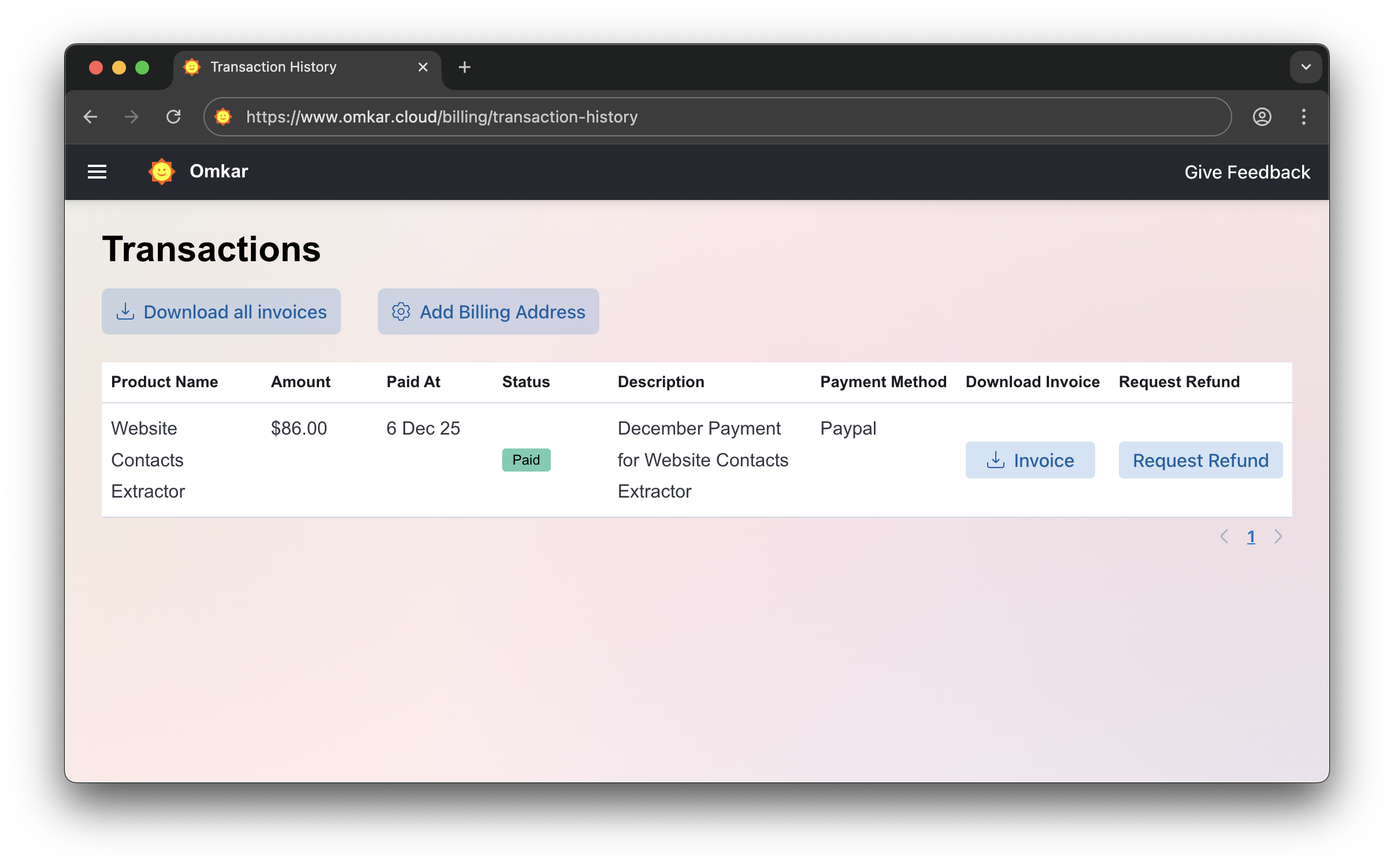
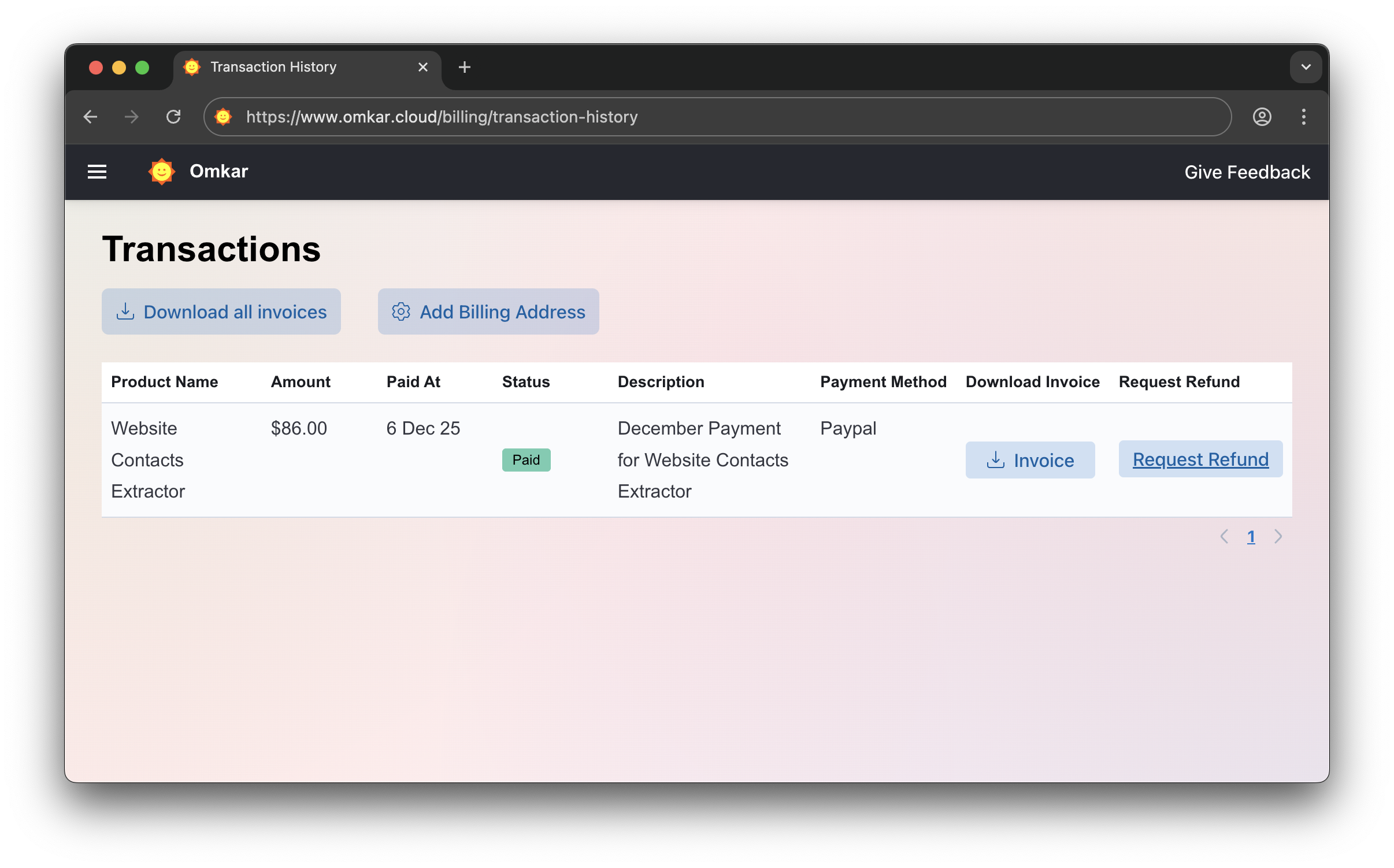
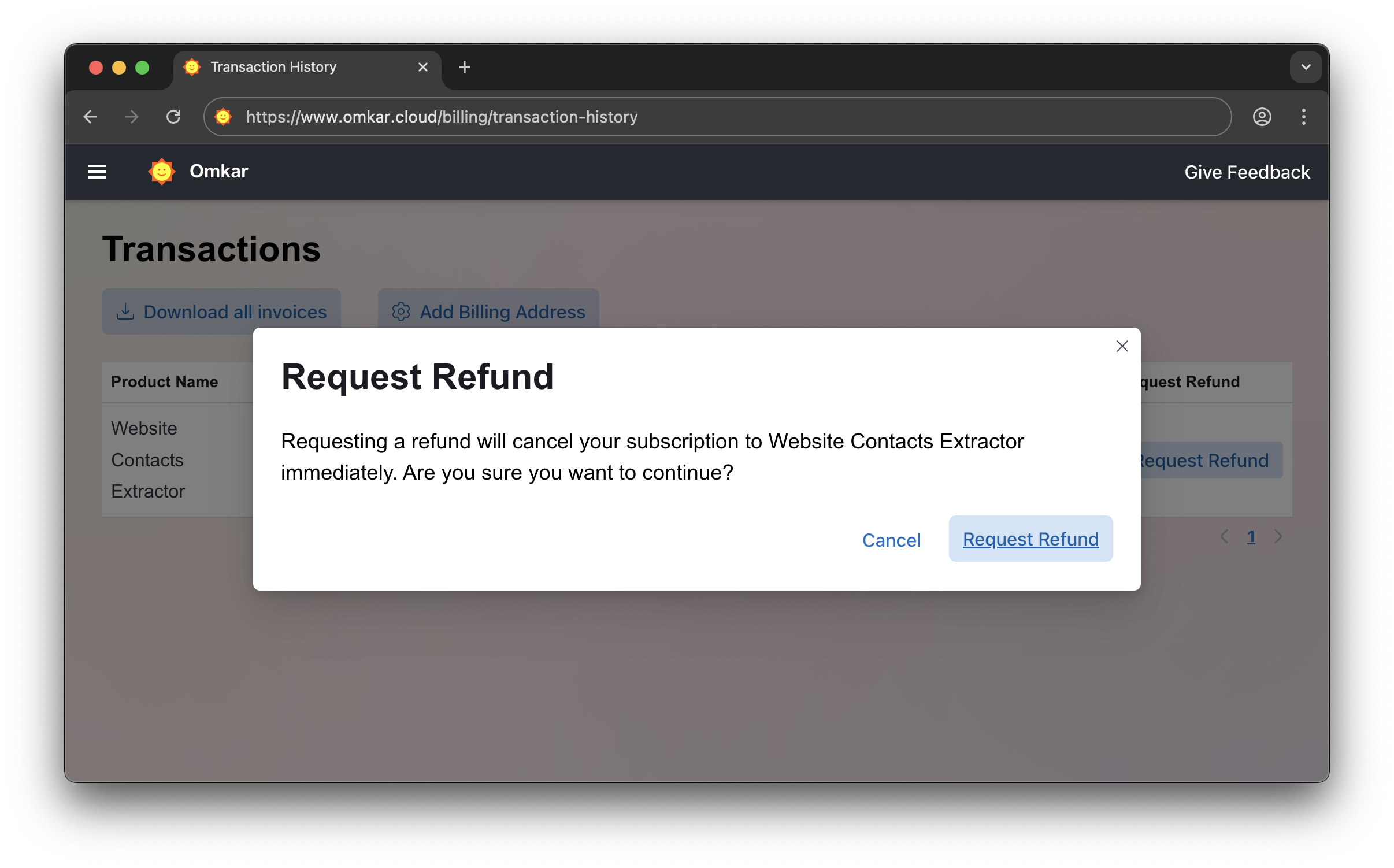
❓ How do I get a refund?
If the product doesn't meet your needs within 90 days, get a refund in 2 clicks.
-
Go to Transactions Page
-
Click "Request Refund"
-
Confirm by clicking Request Refund again. The amount will be refunded within 1-2 business days. We'll email you updates.
No emails. No explanations. Simple 2-click process.
❓ Is there a catch in refunds?
No catch.
It's a simple 2-click process, exactly as described above.
Questions? We have answers.
Reach out anytime. We will solve your query within 1 working day.