Capterra Scraper
Capterra Scraper
The Capterra Scraper turns any of Capterra's 108,726 product profiles into structured JSON. One GET request returns:
- Ratings — overall score plus the 5-dimension breakdown: ease of use, functionality, value for money, customer support, and likelihood to recommend
- Reviews — highlighted reviews with full pros/cons text and rich reviewer context (job title, company size, industry, time used)
- Product details — pricing plans, integrations, deployment options, mobile apps, alternatives, comparisons, and pros/cons summaries
More endpoints cover category listings and the complete product directory — 108,726 products across 8,399 categories.
Rated Excellent on Trustpilot — 4.6 from 25 reviews — and 1,000+ developers have sponsored our open source work on GitHub.
Open the Playground — run a live request, free, no signup
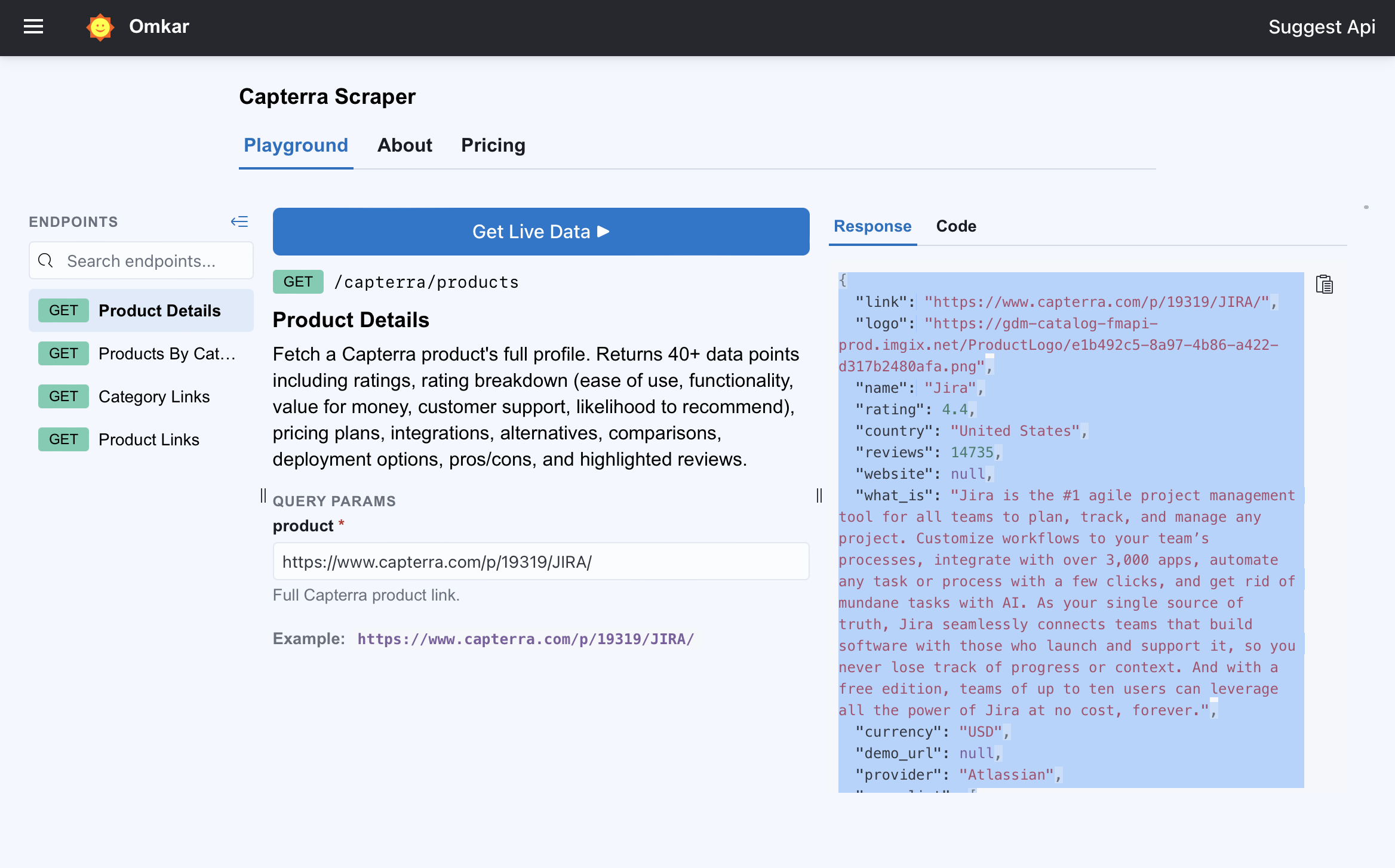
Example: Scrape Capterra Reviews and Product Data in One Request
Here's what the Capterra products API returns for a single product — one GET request against Jira's Capterra profile:
GET https://capterra-scraper.omkar.cloud/capterra/products?product=https://www.capterra.com/p/19319/JIRA/
{
  "name": "Jira",
  "link": "https://www.capterra.com/p/19319/JIRA/",
  "provider": "Atlassian",
  "what_is": "Jira is the #1 agile project management tool for all teams to plan, track, and manage any project. Customize workflows to your team's processes, integrate with over 3,000 apps, automate any task or process with a few clicks.",
  "rating": 4.4,
  "reviews": 14735,
  "rating_breakdown": {
    "ease_of_use_rating": 4.1,
    "functionality_rating": 4.4,
    "value_for_money_rating": 4.3,
    "customer_support_rating": 4.2,
    "likelihood_to_recommend": 7.4
  },
  "country": "United States",
  "year_founded": "2013",
  "target_audience": "All teams",
  "offers_free_trial": true,
  "offers_free_version": true,
  "pricing_plans": [
    { "plan_name": "Free", "price": null, "pricing_model": "Other", "payment_frequency": "Per Month" },
    { "plan_name": "Standard", "price": 7.16, "pricing_model": "Per User", "payment_frequency": "Per Month" }
  ],
  "deployment_options": ["Cloud", "SaaS"],
  "integrations": [
    { "name": "Confluence" },
    { "name": "Salesforce Sales Cloud" }
  ],
  "alternatives": [
    { "name": "Asana", "link": "https://www.capterra.com/p/184581/Asana-PM/", "reviews": 13058, "rating": 4.5 },
    { "name": "Trello", "link": "https://www.capterra.com/p/211559/Trello/", "reviews": 23243, "rating": 4.5 }
  ],
  "pros_list": [
    "I like the functionality the ability to run real time reports and issue tracking with ease. I love the collaboration amongst peers and so every stakeholder is informed."
  ],
  "cons_list": [
    "Particularly for new users, the learning curve can be quite hard. The UI can feel overwhelming at first."
  ],
  "highlighted_reviews": [
    {
      "title": "Powerful Project Management Tool.",
      "rating": 5.0,
      "likelihood_to_recommend": 10.0,
      "overall": "Jira has proven to be an effective solution for managing software development projects, facilitating better teamwork and task streamlining.",
      "pros_text": "Jira has great project tracking and management features and is quite customizable. The agile boards make work management and sprint tracking easy.",
      "cons_text": "Particularly for new users, the learning curve can be quite hard.",
      "reviewer": {
        "full_name": "Suman H.",
        "job_title": "Manager",
        "company_size": "11-50 employees",
        "industry": "Civil Engineering",
        "used_product_for": "2+ years"
      },
      "link": "https://www.capterra.com/p/19319/JIRA/reviews/Capterra___6484625/"
    }
  ]
}
Trimmed for readability — the full response carries 40+ fields. Complete samples are in the API Reference.
Run this exact request in the Playground — no signup →
The playground opens prefilled with this request and runs it against the live API in your browser. What comes back is exactly what your code would get.
What Data Can You Get from Capterra?
Every Capterra product profile breaks down into fields the API returns as clean JSON:
- Ratings — overall score, total review count, and the 5-dimension breakdown (ease of use, functionality, value for money, customer support, likelihood to recommend)
- Reviews — highlighted reviews with title, overall verdict, full pros/cons text, rating, and reviewer context: job title, company size, industry, and time used
- Pricing — every listed plan with price, pricing model, and payment frequency, plus the vendor's pricing description
- Product facts — provider, country, year founded, target audience, free trial/version flags, deployment options, mobile apps, support and training options
- Integrations — every listed integration with its logo
- Market position — popular alternative, alternatives with ratings, and head-to-head comparison links
- Categories — the product's main category and every category it's listed in
The category endpoint returns every product in a category as links + IDs, ready to feed back into Product Details. Coverage spans 108,726 products in 8,399 categories.
API Reference
All endpoints are GET requests against https://capterra-scraper.omkar.cloud, authenticated with the API-Key header, returning JSON.
Product Details & Reviews
▶ Try it live in the Playground — free, no signup →
GET https://capterra-scraper.omkar.cloud/capterra/products?product=https://www.capterra.com/p/19319/JIRA/
Pass the full Capterra product link — the one with the product ID (https://www.capterra.com/p/19319/JIRA/).
Returns 40+ fields: the 5-dimension rating breakdown, highlighted reviews, pricing plans, integrations, deployment options, alternatives, comparisons, and pros/cons. See the trimmed sample above — the full version adds product_id, logo, categories, images_and_videos, popular_alternative, support_options, mobile_apps, training_options, and more.
Products by Category
▶ Try it live in the Playground →
GET https://capterra-scraper.omkar.cloud/capterra/categories?category=https://www.capterra.com/customer-relationship-management-software/
Pass the full Capterra category link. Returns product links and IDs for every product in the category — feed them into Product Details & Reviews.
Sample response:
{
  "link": "https://www.capterra.com/customer-relationship-management-software/",
  "count": 1834,
  "results": [
    { "link": "https://www.capterra.com/p/136797/RAYNET-CRM/", "id": 136797 },
    { "link": "https://www.capterra.com/p/204998/Bigin-by-Zoho-CRM/", "id": 204998 },
    { "link": "https://www.capterra.com/p/132666/Pipedrive/", "id": 132666 }
  ]
}
Category Links
A directory of every Capterra category — all 8,399 of them — ready to feed into Products by Category.
▶ Try it live in the Playground →
GET https://capterra-scraper.omkar.cloud/capterra/category-links
Takes no parameters.
Sample response:
{
  "count": 8399,
  "links": [
    "https://www.capterra.com/360-degree-feedback-software/",
    "https://www.capterra.com/360-degree-feedback-software/s/android/",
    "https://www.capterra.com/360-degree-feedback-software/s/free/"
  ]
}
Product Links
The complete Capterra product directory — 108,726 links — ready to feed into Product Details & Reviews. Crawl Capterra end to end without guessing a single URL.
▶ Try it live in the Playground →
GET https://capterra-scraper.omkar.cloud/capterra/product-links
Takes no parameters.
Sample response:
{
  "count": 108726,
  "links": [
    "https://www.capterra.com/p/64/AccountMate-SQL-Software/",
    "https://www.capterra.com/p/73/FlexiFinancials/",
    "https://www.capterra.com/p/75/Everest-Enterprise-PLUS/"
  ]
}
Every call above counts as a single request against your monthly quota — details under Pricing.
Pricing
- Free — $0 — 100 requests/month
- Grow — $48/month — 15,000 requests/month
- Scale — $148/month — 75,000 requests/month
1 API call = 1 request
The API serves pre-crawled data that can be a few months old — the newest data is the full re-crawled dataset, available for purchase; see Dataset Downloads below.
Full plan details are on the Pricing tab →
Get Your API Key
Every plan starts free: 100 requests a month, and signup takes an email address — no password, no credit card. Paid plans carry a 90-day, 2-click refund.
Free Capterra Dataset Downloads
Two directory files, free to download, no signup:
The API and these files come from a pre-crawled snapshot of Capterra that can be a few months old — plenty for competitive research, lead generation, and market analysis. If you need the newest reviews across all 108,726 products, the full refreshed dataset is available for purchase: email us or WhatsApp us.
Prefer to crawl through the API instead? Feed either file into Product Details & Reviews or Products by Category.
FAQs
Can I try the Capterra Scraper API before signing up?
Yes — the playground runs live requests in your browser with no account and no API key. Try it in the Playground →
How do I scrape Capterra reviews?
Call Product Details & Reviews with a product URL. Every response includes highlighted reviews with full pros/cons text, ratings, the 5-dimension rating breakdown, and rich reviewer context — job title, company size, industry, and how long they used the product.
What's the difference between the API and the dataset downloads?
Three things live on this page. The API returns full product data on demand, metered by your monthly quota. The free downloads are directory files — every product and category link — for discovering what to scrape. The paid dataset is the freshly re-crawled full corpus, for when a months-old snapshot isn't enough.
How fresh is the data, and how do I get the newest?
API responses come from a pre-crawled snapshot that can be a few months old. The freshest data is the full re-crawled dataset, available for purchase — the contact links are under Free Capterra Dataset Downloads. (The free directory files there come from the same snapshot as the API.)
What product link format do I pass?
Pass the full Capterra product URL — the one with the product ID, like https://www.capterra.com/p/19319/JIRA/. For categories, pass the full category URL, like https://www.capterra.com/customer-relationship-management-software/.
How do I discover products and categories to scrape?
The Product Links and Category Links endpoints return the complete directories — 108,726 products and 8,399 categories — and the same files are free to download.
Who's Behind the Capterra Scraper API?
Omkar Cloud is run by the developers who build the APIs — write in and an engineer answers, not a support script. What you can check for yourself:
- 4.6 from 25 reviews on Trustpilot
- 1,000+ developers sponsor our open-source work on GitHub
- Every paid plan carries a 90-day, 2-click refund
The same API pattern powers our G2 and Trustpilot scrapers.
More Review-Data APIs: Google Maps, G2 & Trustpilot
- Google Maps Scraper (3,100+ GitHub Stars) — need tens of thousands of leads? Type a niche and a city ("dentists in New York") and get every matching business as a ready-to-call lead list — name, address, phone, website, emails, rating, and reviews. The free tier alone pulls up to 100K leads a month, enough to run your entire outreach pipeline on $0.
- Website Email Contact Scraper — free and open source: point it at any website and get every email, phone number, and social profile on it, each with source pages and an official/unofficial flag.
- G2 Scraper API — the same clean JSON for 240,975 G2 products: ratings, pricing plans, features, alternatives, and each product's AI-found website with contacts. Cross-reference a vendor's Capterra and G2 ratings before you trust either.
- Trustpilot Scraper API — real-time data for 1.6M+ companies, pulled live: keyword search, full profiles with rating distributions, and every review for any domain. 200 free requests/month.
Video Tutorial
Prefer a walkthrough? Watch the complete API demo:

Support
Built by developers, for developers — when you reach out, you talk to the engineers who built the API, not a support script. Message us anytime and we'll solve your query within 1 working day.

Email: happy.to.help@omkar.cloud

Love It? Review It ⭐
From one developer to another: if the Capterra Scraper API saved you time, please leave a review on Trustpilot. It takes less than a minute, and it means a lot.
Here's why it matters. Most people do judge an API by its reviews. Your review helps another developer — someone just like you, deciding whether the Capterra data here is real and reliable — find this API and build with confidence.
It takes only 60 seconds, and I will personally thank you for it.