Yandex Scraper
Yandex Search API
TLDR
- Scrape Yandex organic results, knowledge panels, image carousels, and ad results — all from one API.
- 25 free queries per month. No credit card required.
Here's a sample organic result:
{
  "rank": 1,
  "title": null,
  "url": "https://en.wikipedia.org/wiki/Linus_Torvalds",
  "description": "Linus Benedict Torvalds[a] (born 28 December 1969) is a Finnish and American software engineer who is the creator and lead developer of the Linux kernel since 1991."
}
What is this?
The Yandex Search API gives you real-time access to Yandex search results as clean, structured JSON.
Run any query and get back organic results, the knowledge panel (rich entity data: bio, family, see-also entities, photos), inline image and video carousels, and paid ads — in one request.
You pick the Yandex domain (yandex.com, yandex.ru, yandex.uz, yandex.com.tr, etc.), the interface language, and the time window. We handle proxies, parsing, pagination, and edge cases.
Perfect for SEO rank tracking on Yandex, market research in Russia/CIS, brand monitoring, building search-powered tools, or any app that needs Yandex data without the scraping headache.
Why use it?
1. Detailed Data with 100% Accuracy
Get the full Yandex SERP in real time. Every result, every entity fact, every image — pulled live. No stale caches.
Organic results, sponsored ads, the knowledge panel with biographical fields and related entities, inline image carousels, inline videos with view counts, and pagination metadata — it's all there in one response.
2. Free Plan
25 queries per month. Free. No credit card required.
Build and test your integration before you pay a dollar.
How to use it?
Simple REST API. Here's how it works:
- Create an account at omkar.cloud to get your API key.
It takes 2 minutes to sign up. You get 25 free queries every month for full Yandex SERPs.
This is the best Yandex Search API on the market. Your search ends here.
- Make a request with it:
cURL:
curl -X GET "https://yandex-scraper.omkar.cloud/yandex/serp?query=Linus%20Torvalds" \
  -H "API-Key: YOUR_API_KEY"
Python:
import requests

api_key = "YOUR_API_KEY"

response = requests.get(
    "https://yandex-scraper.omkar.cloud/yandex/serp",
    params={"query": "Linus Torvalds"},
    headers={"API-Key": api_key}
)
print(response.json())- Get structured Yandex SERP data and use it.
That's it. Keyword to clean JSON in milliseconds.
API Reference
SERP Lookup
GET https://yandex-scraper.omkar.cloud/yandex/serp
query(required) — Search keyword or phrase. Accepts the same operators you'd type into Yandex (site:,intitle:, etc.).domain(optional, default:yandex.com) — Yandex top-level domain. Examples:yandex.com,yandex.ru,yandex.uz,yandex.com.tr,yandex.kz,yandex.by. Picks the region and default language.language(optional) — Interface and results language code (e.g.,tr,kk,uk). Defaults are derived from the domain.sort_by(optional, default:best_match) — Result ordering:best_match(relevance) ornewest_first(most recent).page(optional, default:1) — 1-based page number.
Example:
import requests

response = requests.get(
    "https://yandex-scraper.omkar.cloud/yandex/serp",
    params={"query": "Linus Torvalds"},
    headers={"API-Key": "YOUR_API_KEY"}
)

print(response.json())
Sample Response:
{
  "result_count": 10,
  "current_page": 1,
  "next": "https://yandex-scraper.omkar.cloud/yandex/serp?query=Linus+Torvalds&page=2",
  "previous": null,
  "search_query": "Linus Torvalds",
  "result_state": "Results for exact spelling",
  "results": [
    {
      "rank": 1,
      "title": null,
      "url": "https://en.wikipedia.org/wiki/Linus_Torvalds",
      "description": "Linus Benedict Torvalds[a] (born 28 December 1969) is a Finnish and American software engineer who is the creator and lead developer of the Linux kernel since 1991."
    },
    {
      "rank": 2,
      "title": null,
      "url": "https://www.youtube.com/watch?v=o8NPllzkFhE",
      "description": "Linus Torvalds transformed technology twice — first with the Linux kernel, which helps power the Internet, and again with Git, the source code management sys...Duration 21 minutes 29 seconds7 mln viewsPublished on3 May 2016"
    },
    {
      "rank": 3,
      "title": null,
      "url": "https://www.ted.com/talks/linus_torvalds_the_mind_behind_linux",
      "description": "Linus Torvalds transformed technology twice -- first with the Linux kernel, which helps power the Internet, and again with Git, the source code management system..."
    }
  ],
  "knowledge_panel": {
    "title": "Linus Torvalds",
    "header_images": [
      "https://avatars.mds.yandex.net/i?id=a4fba0a7a3170e332e64269e305908fdae08d7f0-10700817-images-thumbs&n=13",
      "https://avatars.mds.yandex.net/i?id=be3e1268c1da6da49958e98ea407785a592c5ad7-8491894-images-thumbs&n=13"
    ],
    "description": "Finnish and American software engineer who is the creator and lead developer of the Linux kernel since 1991. He also created the distributed version control system Git.",
    "source": {
      "name": "en.wikipedia.org",
      "link": "http://en.wikipedia.org/wiki/Linus Torvalds"
    },
    "born": "December 28, 1969 (56 years), Helsinki, Finland",
    "height": "177 cm",
    "married_to": "Tove Torvalds",
    "parents": "Anna Torvalds, Nils Torvalds",
    "children": "Daniela Yolanda Torvalds, Celeste Amanda Torvalds, Patricia Miranda Torvalds",
    "website": "torvalds-family.blogspot.com",
    "see_also": [
      {
        "name": "Bill Gates",
        "link": "https://yandex.com/search?text=Bill%20Gates&lr=84&ento=0oCghydXczMjEzMBINcnV3NTY3NTphc3NvYxgDeghTZWUgYWxzbw",
        "image": "https://avatars.mds.yandex.net/get-entity_search/2048976/1220586808/S88x116Face_2x"
      },
      {
        "name": "Tim Berners-Lee",
        "link": "https://yandex.com/search?text=Tim%20Berners-Lee&lr=84&ento=0oCghydXc1MzgwNhINcnV3NTY3NTphc3NvYxgDeghTZWUgYWxzbw",
        "image": "https://avatars.mds.yandex.net/get-entity_search/2321801/1248064640/S88x116Face_2x"
      },
      {
        "name": "Richard Stallman",
        "link": "https://yandex.com/search?text=Richard%20Stallman&lr=84&ento=0oCgdydXc4NjY3Eg1ydXc1Njc1OmFzc29jGAN6CFNlZSBhbHNv",
        "image": "https://avatars.mds.yandex.net/get-entity_search/137430/1229656801/S88x116Face_2x"
      }
    ]
  },
  "images": [
    {
      "image_url": "https://searchapi.api.cloud.yandex.net/v2/web/search/images/search?text=Linus+Torvalds&img_url=https%3A%2F%2Fupload.wikimedia.org%2Fwikipedia%2Fcommons%2Fthumb%2F6%2F69%2FLinus_Torvalds.jpeg%2F500px-Linus_Torvalds.jpeg&pos=0&rpt=simage"
    },
    {
      "image_url": "https://searchapi.api.cloud.yandex.net/v2/web/search/images/search?text=Linus+Torvalds&img_url=https%3A%2F%2Fupload.wikimedia.org%2Fwikipedia%2Fcommons%2Fthumb%2F2%2F2f%2FLinus_Torvalds_talking.jpeg%2F500px-Linus_Torvalds_talking.jpeg&pos=1&rpt=simage"
    }
  ]
}
FAQs
❓ What data does the API return?
SERP Lookup returns per response:
Top-level fields:
search_query— the query Yandex actually ran (after typo correction)result_state— how Yandex matched your queryresult_count,current_page,next,previous— pagination metadata
Per organic result:
- Rank, title, URL, description, display URL
- Thumbnail image, date text, video duration, video quality (when present)
- Sub-links (inline and expanded sitelinks with title, URL, description)
Sponsored results (ads):
- Rank, title, URL, description, display URL
- Thumbnail, duration, sitelinks
Knowledge panel (when Yandex shows one):
- Entity title and description
- Header image gallery
- Biographical fields (born, height, family, occupation, etc.)
- Source attribution (Wikipedia, etc.)
- Related entities ("see also") with names, links, and avatars
Inline images carousel:
- Image URL and (when available) title and thumbnail
more_images_urlto fetch the full image SERP
Inline videos carousel:
- Title, URL, source name, source URL
- Duration, thumbnail, view count, view text, publish date
more_videos_urlto fetch the full video SERP
All in structured JSON. Ready to use.
❓ How accurate is the data?
Data is pulled from Yandex in real time. Every API call fetches a live SERP — not cached or pre-scraped results.
Rankings, snippets, knowledge panel facts, and ads reflect what Yandex is showing right now.
❓ Which Yandex domains and regions are supported?
All of them. Pass any Yandex top-level domain via the domain parameter:
yandex.com— global, English defaultsyandex.ru— Russiayandex.com.tr— Turkeyyandex.kz— Kazakhstanyandex.by— Belarusyandex.uz— Uzbekistan
You also get the right default language and a regional result mix for each domain. Override the language with the language parameter if you need to.
❓ Can I filter by recency (last day, last month)?
Yes — use the sort_by parameter:
best_match— Yandex's default relevance rankingnewest_first— most recent results first, surfacing news, fresh blog posts, and recent updates
Combine this with paging to crawl the freshest content on any topic.
❓ Do you handle pagination?
Yes. Pass page=2, page=3, etc. Pages are 1-based.
Every response also includes ready-to-call next and previous URLs so you can walk pages without computing them yourself.
❓ Why is title sometimes null?
Yandex doesn't always emit a standalone title in the result block — for entity-heavy SERPs (people, places, brands) it ships the title in the knowledge panel instead. We pass title: null through honestly when Yandex omits it, rather than guessing. Use url and description as the always-present identifiers.
❓ Tell me about Omkar Cloud.
We're an API services company with 20+ tools for OCR, document processing, and developer APIs. Some things we're proud of:
- We built Botasaurus, an open-source scraping framework with 3.7K+ GitHub stars
- Sponsored by 1000+ developers on GitHub
❓ How much does it cost?
- Free — $0 — 25 queries/month
- Starter — $16 — 800 queries/month
- Grow — $48 — 2,400 queries/month
- Scale — $148 — 7,400 queries/month
Why we're affordable: Low overhead. We run lean and pass the savings to you.
Note: You get 25 free queries every month.
❓ How do I get a refund?
If the product doesn't meet your needs within 90 days, get a refund in 2 clicks.
-
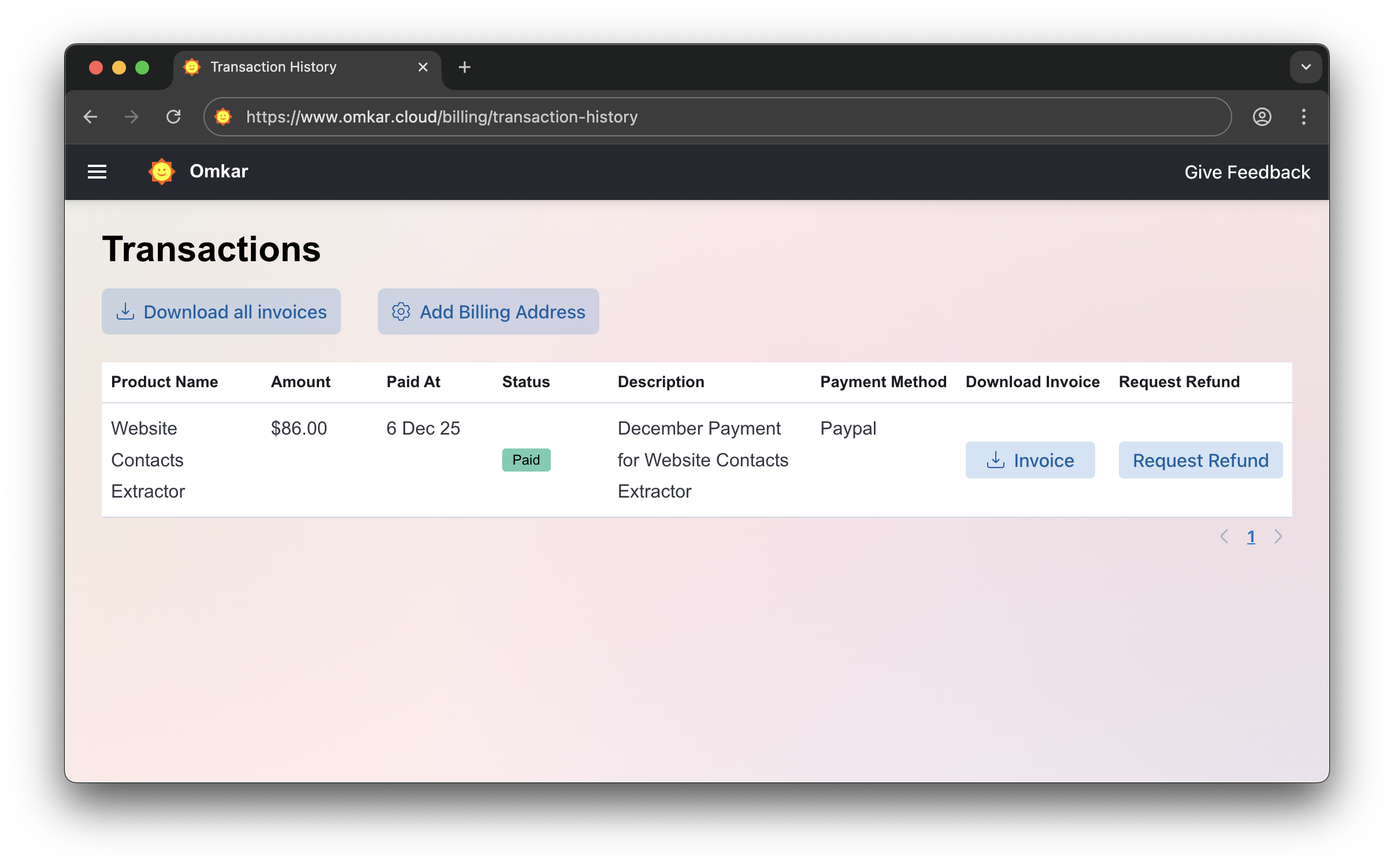
Go to Transactions Page
-
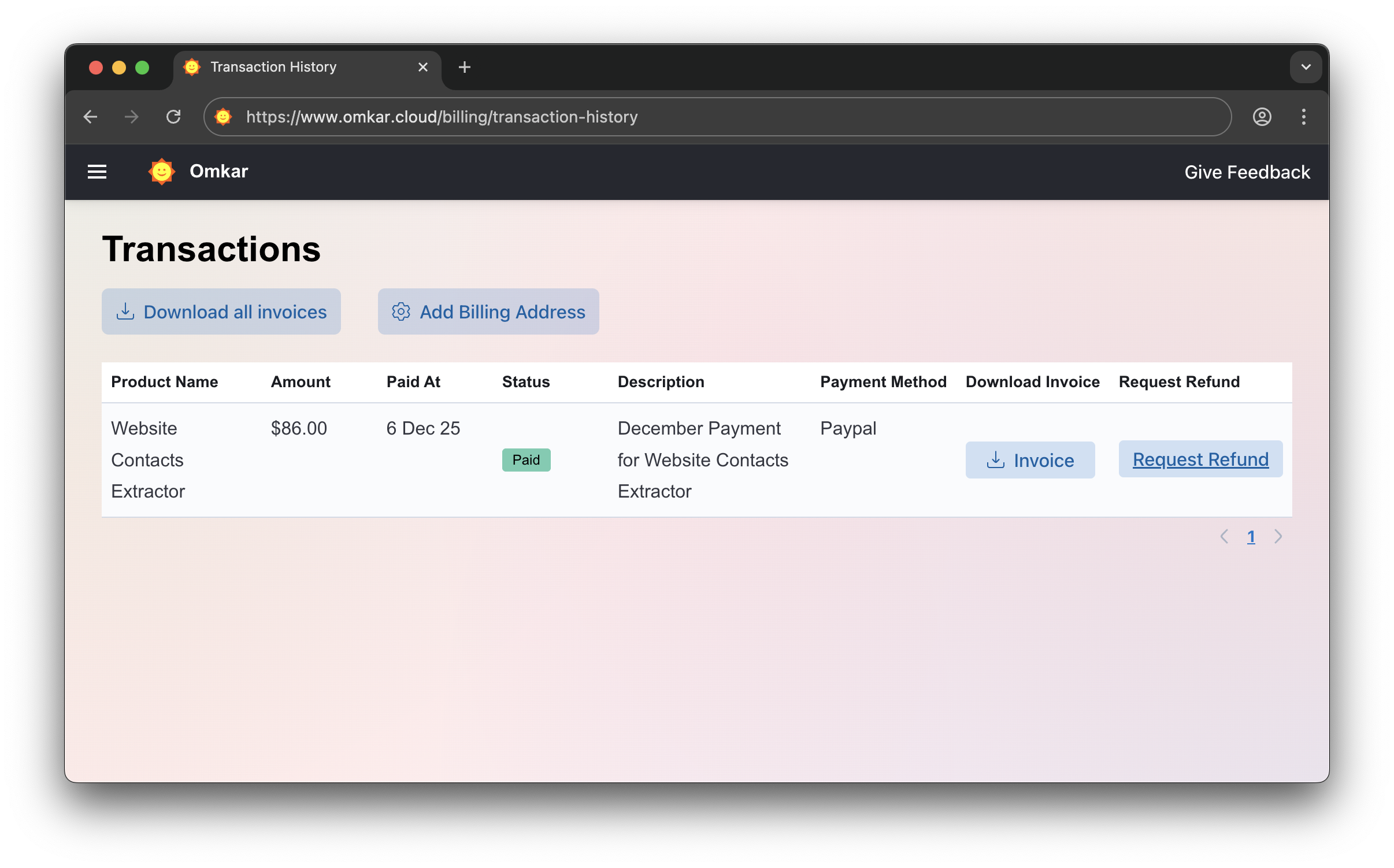
Click "Request Refund"
-
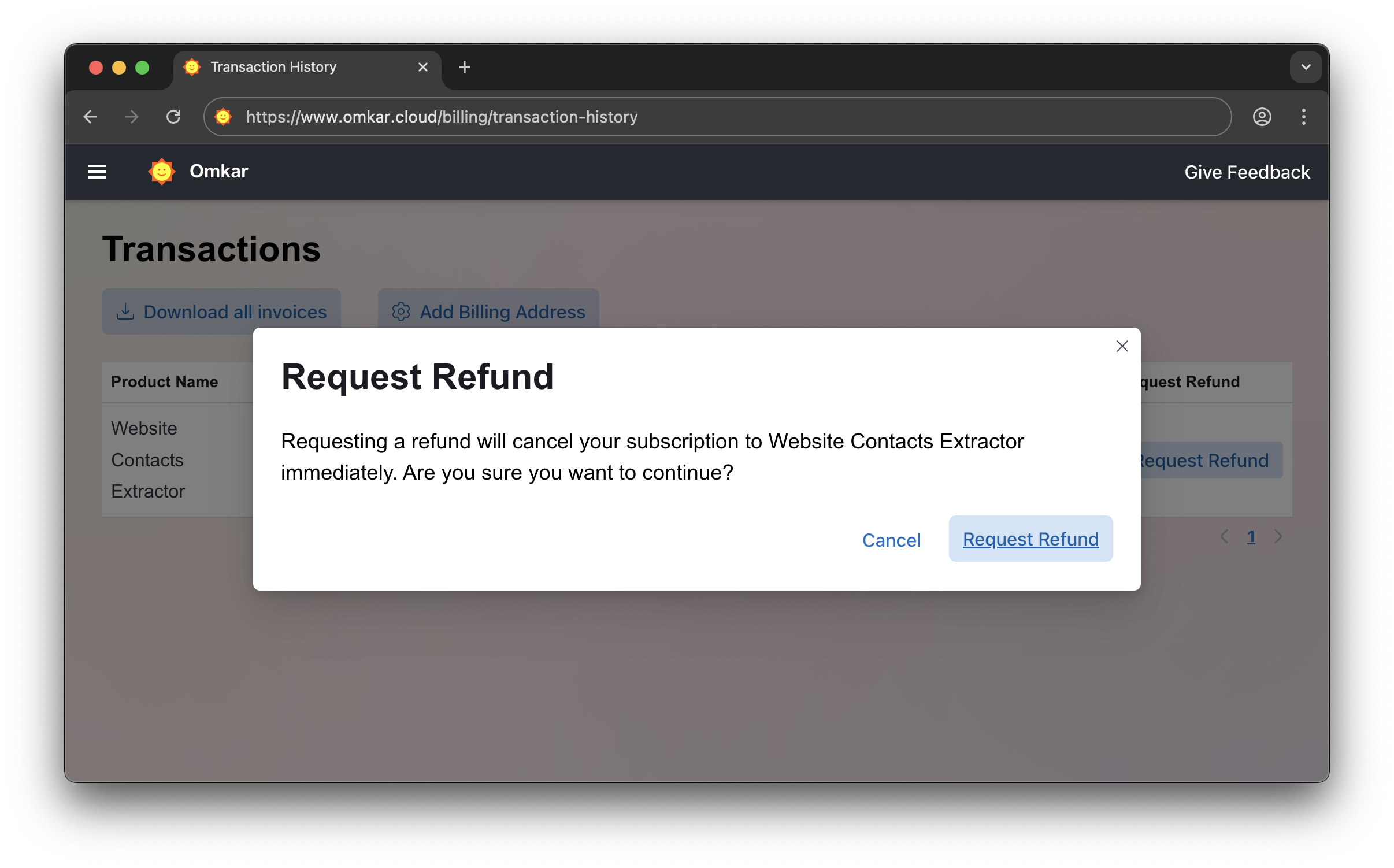
Confirm by clicking Request Refund again. The amount will be refunded within 1-2 business days. We'll email you updates.
No emails. No explanations. Simple 2-click process.
❓ Is there a catch in refunds?
No catch.
It's a simple 2-click process, exactly as described above.
Questions? We have answers.
Reach out anytime. We'll solve your query within 1 working day.