G2 Scraper
G2 Scraper
The G2 Scraper turns any of G2's 290,176 product profiles into structured JSON. One GET request returns:
- The product's website and its contacts — emails, phone numbers, social profiles, and the technologies it runs, extracted by our open-source Website Email Contact Scraper. Only ~2% of G2 products list a website on their profile — we find it with AI for the rest (
likely_product_website) - Ratings and pricing — overall score and every listed plan with features
- Company details — seller, location, founded year, alternatives, comparisons, and social profiles
More endpoints cover reviews, category listings, seller (vendor) profiles, and the complete product directory.
For reviews, G2 itself stops serving them after page 10 — when you paginate past that, we automatically combine multiple filters behind the scenes to keep the reviews coming, giving you more reviews than G2 provides on its own.
Rated Excellent on Trustpilot — 4.6 from 25 reviews — and 1,000+ developers have sponsored our open source work on GitHub.
Open the Playground — run a live request, free, no signup
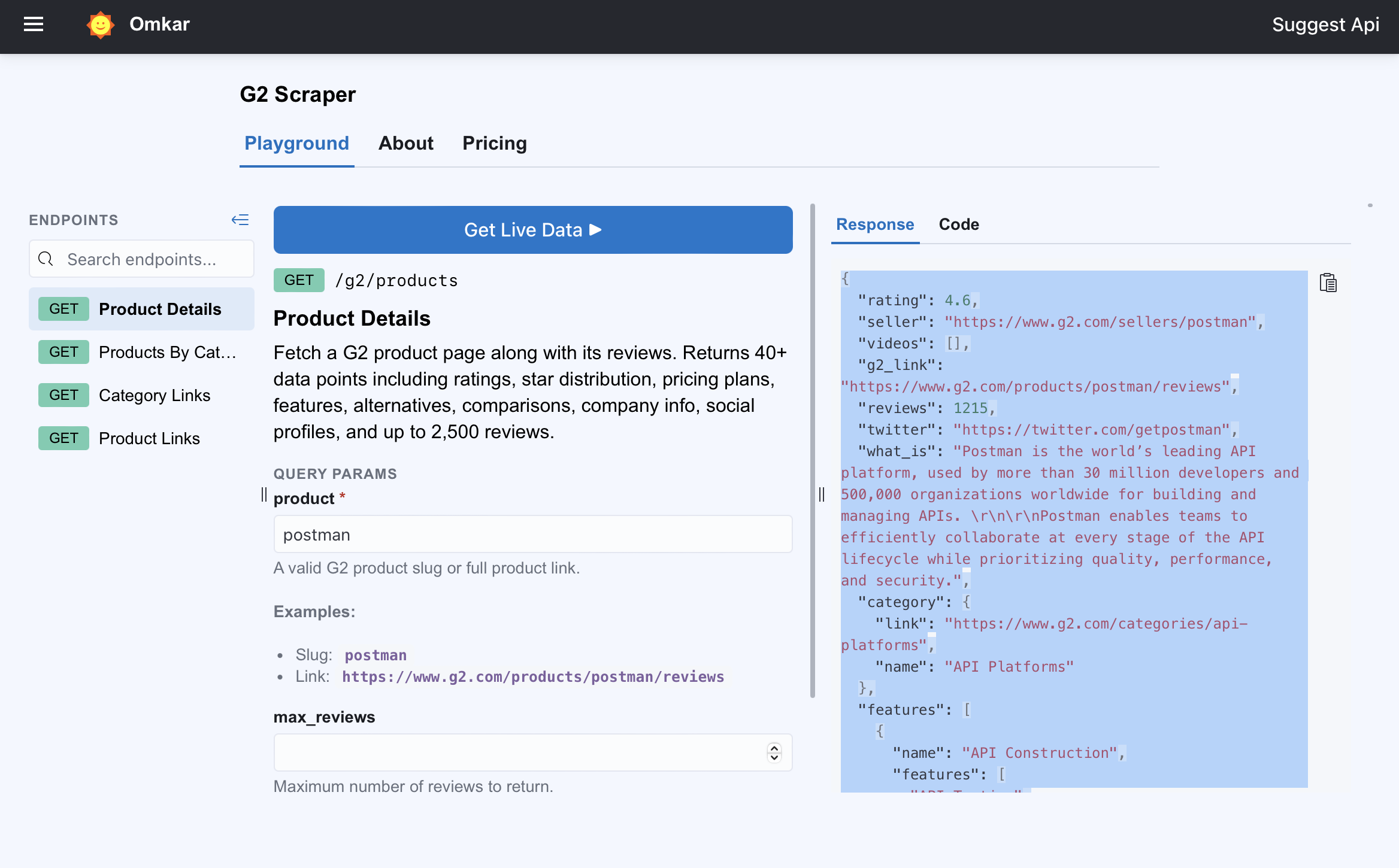
Example: Scrape G2 Reviews and Product Data in One Request
Here's what the G2 products API returns for a single product — one GET request against Postman's G2 profile:
GET https://g2-scraper.omkar.cloud/g2/products?product=postman
{
  "product_id": 20238,
  "product_name": "Postman",
  "rating": 4.6,
  "reviews": 1800,
  "product_website": null,
  "likely_product_website": "https://www.postman.com",
  "website_contacts": {
    "domain": "www.postman.com",
    "emails": [
      {
        "value": "info@postman.com",
        "sources": ["https://www.postman.com/company/contact-us/"],
        "is_likely_official": true
      },
      {
        "value": "help@postman.com",
        "sources": ["https://www.postman.com/company/contact-sales/"],
        "is_likely_official": false
      }
    ],
    "phones": [
      {
        "value": "+18886161665",
        "sources": ["https://www.postman.com/company/contact-sales/"],
        "is_likely_official": true
      }
    ],
    "linkedins": [
      { "value": "https://www.linkedin.com/company/postman-platform", "is_likely_official": true }
    ],
    "twitters": [
      { "value": "https://x.com/getpostman", "is_likely_official": true }
    ],
    "instagrams": [
      { "value": "https://www.instagram.com/getpostman", "is_likely_official": true }
    ],
    "discords": [
      { "value": "https://discord.gg/58aNNsRBGR", "is_likely_official": true }
    ],
    "githubs": [
      { "value": "https://github.com/postmanlabs", "is_likely_official": true }
    ],
    "technologies": [
      { "name": "Amazon Web Services", "categories": ["PaaS"] },
      { "name": "Cloudflare", "categories": ["CDN"] }
    ]
  },
  "g2_link": "https://www.g2.com/products/postman/reviews",
  "seller": "Postman",
  "what_is": "Postman is the world's leading API platform, used by more than 30 million developers and 500,000 organizations worldwide for building and managing APIs.",
  "category": { "name": "API Platforms", "link": "https://www.g2.com/categories/api-platforms" },
  "company_location": "San Francisco, CA",
  "company_founded_year": 2014,
  "company_website": "https://www.postman.com",
  "number_of_employees_on_linkedin": 2305,
  "pricing_plans": [
    {
      "plan_name": "Free Plan",
      "plan_price": "Free",
      "plan_description": "For individuals or a small team of 3 or less to start testing APIs.",
      "plan_features": ["Up to 3 collaborators"]
    }
  ],
  "alternatives": [
    { "name": "MuleSoft Anypoint Platform", "link": "https://www.g2.com/products/mulesoft-anypoint-platform/reviews", "rating": 4, "reviews": 655 }
  ],
  "comparisons": [
    { "name": "SwaggerHub", "link": "https://www.g2.com/compare/postman-vs-swaggerhub" }
  ]
}
Trimmed for readability — the full response carries 40+ fields. Complete samples are in the API Reference.
Postman doesn't list a website on its G2 profile (product_website: null) — like ~98% of G2 products. We find it with AI (likely_product_website), then crawl it with our open-source Website Email Contact Scraper to pull the emails, phone numbers, and social profiles you see above.
Run this exact request in the Playground — no signup →
The playground opens prefilled with this request and runs it against the live API in your browser. What comes back is exactly what your code would get.
What Data Can You Get from G2?
Every G2 product profile breaks down into fields the API returns as clean JSON:
- Product website + contacts — the product's website (AI-found when the G2 profile doesn't list it) with the emails, phone numbers, social profiles, and technologies found on it, via our open-source Website Email Contact Scraper
- Reviews — full text, question/answer breakdown, rating, publish date, reviewer name, job title, and company size, with filters for stars, segment, industry, role, region, and keywords
- Ratings — overall score and total review count
- Pricing — every listed plan with price, description, and features
- Feature scores — per-feature satisfaction percentages with the review counts behind them
- Market position — alternatives, head-to-head comparisons, and categories
- Company — seller, location, founded year, employee count, website, and social profiles with follower counts
- Sellers — full vendor profiles: aggregate rating with star breakdown, total reviews, leader badge, HQ, founded year, social links, featured products, the complete product portfolio, and cross-product review teasers
The category endpoint adds buyer context per product: rating, review count, AI-generated user-sentiment summary, AI-verified badge, and top pros/cons with mention counts — plus AI-generated category FAQs and long-form editorial guides. Coverage spans 290,176 G2 products in 2,227 categories.
API Reference
All endpoints are GET requests against https://g2-scraper.omkar.cloud, authenticated with the API-Key header, returning JSON.
Product Details & Reviews
▶ Try it live in the Playground — free, no signup →
GET https://g2-scraper.omkar.cloud/g2/products?product=postman
Pass a G2 product slug (postman) or the full product URL — either works. Optional website_contacts_crawl_mode controls contact enrichment: homepage (default — scan the website's homepage), deep (also crawl its top contact-like pages: contact, about, careers, blog), or off.
Returns the product's website and the contacts found on it (emails, phone numbers, social profiles, and technologies as website_contacts), plus 40+ fields: rating, pricing plans, feature scores, alternatives, comparisons, company details, and social profiles.
Sample response:
{
  "product_id": 20238,
  "product_name": "Postman",
  "rating": 4.6,
  "reviews": 1800,
  "product_website": null,
  "likely_product_website": "https://www.postman.com",
  "website_contacts": {
    "domain": "www.postman.com",
    "title": "Postman: The World's Leading API Platform | Sign Up for Free",
    "description": "Accelerate API development with Postman's all-in-one platform. Streamline collaboration and simplify the API lifecycle for faster, better results. Learn more.",
    "emails": [
      {
        "value": "info@postman.com",
        "sources": [
          "https://www.postman.com/company/contact-us/",
          "https://www.postman.com/company/about-postman/"
        ],
        "is_likely_official": true
      },
      {
        "value": "help@postman.com",
        "sources": ["https://www.postman.com/company/contact-sales/"],
        "is_likely_official": false
      }
    ],
    "phones": [
      {
        "value": "+18886161665",
        "sources": ["https://www.postman.com/company/contact-sales/"],
        "is_likely_official": true
      },
      {
        "value": "+14157966470",
        "sources": ["https://www.postman.com/company/contact-us/"],
        "is_likely_official": false
      }
    ],
    "linkedins": [
      {
        "value": "https://www.linkedin.com/company/postman-platform",
        "sources": ["https://www.postman.com/"],
        "is_likely_official": true
      }
    ],
    "twitters": [
      { "value": "https://x.com/getpostman", "sources": ["https://www.postman.com/"], "is_likely_official": true }
    ],
    "instagrams": [
      { "value": "https://www.instagram.com/getpostman", "sources": ["https://www.postman.com/"], "is_likely_official": true }
    ],
    "facebooks": [
      { "value": "https://www.facebook.com/getpostman", "sources": ["https://www.postman.com/company/contact-us/"], "is_likely_official": true }
    ],
    "youtubes": [
      { "value": "https://www.youtube.com/channel/UCocudCGVb3MmhWQ1aoIgUQw", "sources": ["https://blog.postman.com/"], "is_likely_official": true }
    ],
    "discords": [
      { "value": "https://discord.gg/58aNNsRBGR", "sources": ["https://www.postman.com/"], "is_likely_official": true }
    ],
    "githubs": [
      { "value": "https://github.com/postmanlabs", "sources": ["https://www.postman.com/"], "is_likely_official": true }
    ],
    "technologies": [
      { "name": "Amazon Cloudfront", "versions": [], "categories": ["CDN"] },
      { "name": "Amazon Web Services", "versions": [], "categories": ["PaaS"] },
      { "name": "Cloudflare", "versions": [], "categories": ["CDN"] }
    ],
    "error": null
  },
  "product_uuid": "06ab3e14-7ed4-4cc9-b6a6-12b92b7fe34c",
  "company_id": 16505,
  "g2_link": "https://www.g2.com/products/postman/reviews",
  "category": {
    "name": "API Platforms",
    "link": "https://www.g2.com/categories/api-platforms"
  },
  "product_logo": "https://images.g2crowd.com/uploads/product/image/large_detail/large_detail_fd527e1fc777d9e31b2a28e8d3c959a4/postman.jpg",
  "what_is": "Postman is the world's leading API platform, used by more than 30 million developers and 500,000 organizations worldwide for building and managing APIs.",
  "product_description": "Postman enables teams to efficiently collaborate at every stage of the API lifecycle while prioritizing quality, performance, and security.",
  "medal_image": "https://images.g2crowd.com/uploads/report_medal/image/1004859/medal.svg",
  "seller": "Postman",
  "company_location": "San Francisco, CA",
  "company_founded_year": 2014,
  "discussions_link": "https://community.postman.com/",
  "twitter": "https://twitter.com/getpostman",
  "number_of_followers_on_twitter": 51725,
  "linkedin": "https://www.linkedin.com/company/3795851/",
  "number_of_employees_on_linkedin": 2305,
  "company_website": "https://www.postman.com",
  "is_claimed": true,
  "categories": [
    { "name": "Software Testing", "link": "https://www.g2.com/categories/software-testing" },
    { "name": "Build Automation", "link": "https://www.g2.com/categories/build-automation" }
  ],
  "pricing_plans": [
    {
      "plan_name": "Free Plan",
      "plan_price": "Free",
      "plan_description": "For individuals or a small team of 3 or less to start testing APIs.",
      "plan_features": ["Up to 3 collaborators"]
    }
  ],
  "alternatives": [
    { "name": "MuleSoft Anypoint Platform", "link": "https://www.g2.com/products/mulesoft-anypoint-platform/reviews", "rating": 4, "reviews": 655 }
  ],
  "comparisons": [
    { "link": "https://www.g2.com/compare/postman-vs-swaggerhub", "name": "SwaggerHub", "logo": "https://images.g2crowd.com/uploads/product/image/small_square/small_square_7ca4052dc540756d666b98eb073a3e58/swaggerhub.png" }
  ],
  "features": [
    { "name": "API Construction", "features": ["API Testing"] }
  ],
  "detailed_features": [
    {
      "name": "API Construction",
      "features": [
        {
          "name": "API Testing",
          "content": "Based on 589 Postman reviews. Provides an environment for users to test their API's functionality, efficiency, and data accuracy.",
          "percentage": 94,
          "based_on_number_of_reviews": 589
        }
      ]
    }
  ],
  "g2_reviews_link": "https://www.g2.com/products/postman/reviews#reviews"
}
Reviews
▶ Try it live in the Playground →
GET https://g2-scraper.omkar.cloud/g2/reviews?product=postman&page=1
Pass a G2 product slug (postman) or the full product URL. Returns 10 reviews per page. Optional filters:
page— page number (10 reviews per page). G2 caps every filter combination at 10 pages — paginate past that and we automatically combine filters behind the scenes to keep the reviews coming.sort—default(G2's relevance ordering),most-recent,most-helpful,highest-rated,lowest-ratedstars— filter by star rating, comma-separated (e.g.stars=4,5)segment— reviewer's company size:small-business,mid-market,enterpriseindustry— comma-separated numeric G2 industry ids, discoverable inavailable_filters.industriesregion—North America,Europe,Asia,Latin America,Middle East,Africa,ANZ(plus G2's localized tagsAmerica Latina,Europa,Norteamerica)role— named roles (User,Administrator,Executive Sponsor,Internal Consultant,Consultant,Agency,Industry Analyst / Tech Writer) or numeric role ids fromavailable_filters.roleskeywords— free-text search within review contents
Each page returns full review text with a question/answer breakdown, rating, reviewer details, publish date, and badges — plus the filtered review count, star distribution, and available_filters: the product's own filter catalog (segment/role/industry/category ids with names and counts, plus pro/con mentions) so you can discover valid filter values for any product.
Sample response:
{
  "count": 1800,
  "per_page": 10,
  "current_page": 1,
  "total_pages": 180,
  "next": "https://g2-scraper.omkar.cloud/g2/reviews?product=postman&page=2",
  "previous": null,
  "product": "postman",
  "g2_link": "https://www.g2.com/products/postman/reviews",
  "order": "g2_default",
  "filters": {},
  "star_distribution": { "1": 5, "2": 2, "3": 14, "4": 299, "5": 1480 },
  "available_filters": {
    "segments": [
      { "id": 179, "name": "Small Business (50 or fewer emp.)", "count": 606 },
      { "id": 180, "name": "Mid-Market (51-1000 emp.)", "count": 637 },
      { "id": 181, "name": "Enterprise ( >1000 emp.)", "count": 501 }
    ],
    "roles": [
      { "id": 1, "name": "User", "count": 1470 },
      { "id": 2, "name": "Administrator", "count": 99 }
    ],
    "industries": [
      { "id": 274, "name": "Computer Software", "count": 614 },
      { "id": 313, "name": "Information Technology and Services", "count": 511 }
    ],
    "regions": [
      { "id": "Asia", "name": "Asia", "count": 1181 },
      { "id": "North America", "name": "North America", "count": 354 }
    ],
    "mentions": [
      { "id": 1724232, "name": "Ease of Use", "type": "pro", "count": 460 },
      { "id": 1729983, "name": "Slow Performance", "type": "con", "count": 222 }
    ]
  },
  "reviews": [
    {
      "id": 13224320,
      "link": "https://www.g2.com/products/postman/reviews/postman-review-13224320",
      "title": "Postman Makes API Development, Testing, and Debugging Fast and Easy",
      "content": "What do you like best about Postman?\nWhat I like best about Postman is how easy it makes API development, testing, and debugging...",
      "question_answers": [
        {
          "question": "What do you like best about Postman?",
          "answer": "What I like best about Postman is how easy it makes API development, testing, and debugging..."
        },
        {
          "question": "What do you dislike about Postman?",
          "answer": "One limitation I've experienced with Postman is that managing large API collections and environments can become difficult as projects grow..."
        }
      ],
      "rating": 5,
      "reviewer": {
        "name": "Harsh G.",
        "job_title": "AI Engineer",
        "industry": "Insurance",
        "company_size": "Mid-Market (51-1000 emp.)",
        "link": "https://www.g2.com/users/3b742ee2-c253-484a-a24d-7a91e62bc8d5"
      },
      "publish_date": "2026-08-07",
      "badges": ["Current User", "Validated Reviewer"],
      "source": "Organic",
      "video_link": null
    }
  ]
}
Products by Category
▶ Try it live in the Playground →
GET https://g2-scraper.omkar.cloud/g2/categories?category=marketing-automation
Pass a category slug (marketing-automation) or the full category URL. Optional: page (15 products per page) and sort (g2-score default, popularity, satisfaction).
Returns 15 structured product entries per page — product id, name, link, logo, seller, rating, review count, AI-generated user-sentiment summary, solution type, AI-verified badge, and top pros/cons with mention counts — plus category metadata, the category's AI-generated FAQs with last-updated date, and long-form editorial sections about the category.
Sample response:
{
  "category": "marketing-automation",
  "name": "Best Marketing Automation Software",
  "link": "https://www.g2.com/categories/marketing-automation",
  "description": "Top Marketing Automation Software. Choose the right Marketing Automation Software using real-time, up-to-date product reviews from 90010 verified user reviews.",
  "total_reviews": 90010,
  "page": 1,
  "last_page": 35,
  "order": "g2_score",
  "products_count": 15,
  "products": [
    {
      "id": 364,
      "name": "HubSpot Marketing Hub",
      "link": "https://www.g2.com/products/hubspot-marketing-hub/reviews",
      "logo": "https://images.g2crowd.com/uploads/product/image/large_detail/large_detail_74390118cdf58a60fb81adaaefdb6287/hubspot-marketing-hub.png",
      "seller": { "name": "HubSpot", "link": "https://www.g2.com/sellers/hubspot" },
      "rating": 4.4,
      "reviews_count": 14921,
      "users_say": "Users consistently praise the ease of use and centralized management of HubSpot Marketing Hub, highlighting its ability to streamline marketing tasks and provide a comprehensive view of campaigns...",
      "solution_type": "All-in-One",
      "is_ai_verified": true,
      "pros": [{ "name": "Ease of Use", "mentions": 1981 }],
      "cons": [{ "name": "Learning Curve", "mentions": 808 }]
    },
    {
      "id": 1934,
      "name": "ActiveCampaign",
      "link": "https://www.g2.com/products/activecampaign/reviews",
      "logo": "https://images.g2crowd.com/uploads/product/image/large_detail/large_detail_50828ef2b93af30b29edd9061533c3b9/activecampaign.jpg",
      "seller": { "name": "ActiveCampaign", "link": "https://www.g2.com/sellers/activecampaign" },
      "rating": 4.4,
      "reviews_count": 14780,
      "users_say": "Users consistently praise the ease of use and powerful automation features of ActiveCampaign, highlighting how intuitive the platform is for managing email campaigns and customer relationships...",
      "solution_type": "All-in-One",
      "is_ai_verified": true,
      "pros": [{ "name": "Ease of Use", "mentions": 848 }],
      "cons": [{ "name": "Learning Curve", "mentions": 419 }]
    }
  ],
  "faqs": {
    "last_updated": "2026-06-15",
    "items": [
      {
        "question": "Which marketing automation software maintains data sync integrity with leading CRM platforms across your organization",
        "answer": "Based on G2 reviews, several products are repeatedly mentioned for CRM-connected workflows and cleaner cross-team visibility. HubSpot Marketing Hub — unified CRM and campaign visibility..."
      }
    ]
  },
  "learn_more": [
    {
      "title": "What is Marketing Automation Software?",
      "content": "Marketing automation software allows companies to optimize their marketing strategy by automating marketing tasks such as email marketing, social media posts, and lead generation..."
    }
  ],
  "next": "https://g2-scraper.omkar.cloud/g2/categories?category=marketing-automation&page=2",
  "previous": null
}
Seller Profile
A G2 seller (vendor) profile — aggregate stats, company info, and the full product portfolio in one call.
▶ Try it live in the Playground →
GET https://g2-scraper.omkar.cloud/g2/sellers?seller=hubspot
Pass a G2 seller slug (hubspot) or the full seller URL. The products list and the reviews list paginate independently: products_page (9 products per page — large sellers like Google span 40+ pages) and reviews_page (3 review teasers per page, capped by G2 at 10 pages).
Returns the seller's hero stats (aggregate rating, star-percentage breakdown, total reviews, number of profiles and categories, leader badge, serving-customers-since year), about block (description, HQ location, year founded, website, social links), featured products, the product portfolio, and cross-product review teasers with links to the full reviews.
Sample response:
{
  "seller": "hubspot",
  "name": "HubSpot",
  "link": "https://www.g2.com/sellers/hubspot",
  "logo": "https://images.g2crowd.com/uploads/vendor/image/316/63ad29dc585e90022b87376175848478.jpeg",
  "description": "HubSpot is a leading agentic customer platform that provides software and support to help businesses grow better...",
  "rating": 4.4,
  "star_percentages": { "1": 0, "2": 0, "3": 3, "4": 26, "5": 68 },
  "total_reviews": 35884,
  "profiles": 12,
  "categories_count": 63,
  "leader_badge": "#1 in 61 categories — Grid® leader",
  "serving_customers_since": 2006,
  "hq_location": "Cambridge, Massachusetts, United States",
  "year_founded": 2006,
  "website": "https://hubspot.com",
  "social_links": {
    "linkedin": "https://www.linkedin.com/company/68529/",
    "twitter": "https://twitter.com/HubSpot"
  },
  "categories": [
    { "name": "CRM Software", "link": "https://www.g2.com/categories/crm" },
    { "name": "Marketing Automation Software", "link": "https://www.g2.com/categories/marketing-automation" }
  ],
  "featured_products": [
    {
      "name": "HubSpot Marketing Hub",
      "link": "https://www.g2.com/products/hubspot-marketing-hub/reviews",
      "reviews_count": 14921,
      "description": "Marketing automation software to help you attract the right audience, convert more visitors into customers..."
    }
  ],
  "products": [
    {
      "id": 364,
      "name": "HubSpot Marketing Hub",
      "link": "https://www.g2.com/products/hubspot-marketing-hub/reviews",
      "logo": "https://images.g2crowd.com/uploads/product/image/large_detail/large_detail_74390118cdf58a60fb81adaaefdb6287/hubspot-marketing-hub.png",
      "medal": "https://images.g2crowd.com/uploads/medal/image/1000602/5f02e1e85438880920c9f4c66d005c33.svg",
      "rating": 4.5,
      "reviews_count": 14921,
      "description": "Marketing automation software to help you attract the right audience, convert more visitors into customers, and run complete inbound marketing campaigns at scale."
    }
  ],
  "products_page": 1,
  "products_last_page": 2,
  "products_page_next": "https://g2-scraper.omkar.cloud/g2/sellers?seller=hubspot&products_page=2",
  "reviews": [
    {
      "title": "HubSpot Helps Me Contribute More Thoroughly, Worry-Free",
      "link": "https://www.g2.com/products/hubspot-sales-hub/reviews/hubspot-sales-hub-review-13277564",
      "snippet": "HubSpot helps me contribute to the team more thoroughly, without having to worry about any problems at all.",
      "rating": 5,
      "product": { "name": "HubSpot Sales Hub", "link": "https://www.g2.com/products/hubspot-sales-hub/reviews" },
      "reviewer": { "name": "Verified User in Staffing and Recruiting", "job_title": null },
      "publish_date": "2026-08-15",
      "badges": ["Validated Reviewer"],
      "source": "Organic"
    }
  ],
  "reviews_page": 1,
  "reviews_last_page": 10,
  "reviews_page_next": "https://g2-scraper.omkar.cloud/g2/sellers?seller=hubspot&reviews_page=2"
}
Seller Products
One page of a seller's All Products & Services portfolio — the lighter counterpart to the full seller profile when only the product list is needed.
▶ Try it live in the Playground →
GET https://g2-scraper.omkar.cloud/g2/sellers/products?seller=google
Pass a G2 seller slug (google) or the full seller URL. Optional page (9 products per page).
Each entry includes the product id, name, link, logo, medal image, star rating, review count, and description. Page 1 also includes the seller's featured-products carousel; later pages omit it so paginating callers collect no duplicates.
Sample response:
{
  "count": 369,
  "per_page": 9,
  "current_page": 1,
  "total_pages": 41,
  "next": "https://g2-scraper.omkar.cloud/g2/sellers/products?seller=google&page=2",
  "previous": null,
  "seller": "google",
  "name": "Google",
  "link": "https://www.g2.com/sellers/google",
  "logo": "https://images.g2crowd.com/uploads/vendor/image/311/da820dfb0bceb23ead050c282acb6770.jpeg",
  "rating": 4.5,
  "total_reviews": 85651,
  "featured_products": [
    {
      "name": "Google Analytics",
      "link": "https://www.g2.com/products/google-analytics/reviews",
      "reviews_count": 6862,
      "description": "Google Analytics not only lets you measure sales and conversions, but also gives you fresh insights into how visitors use your site..."
    }
  ],
  "products": [
    {
      "id": 1434,
      "name": "Google Workspace",
      "link": "https://www.g2.com/products/google-workspace/reviews",
      "logo": "https://images.g2crowd.com/uploads/product/image/large_detail/large_detail_4a9a6d57cdd833bf0381d21fd9246641/google-workspace.png",
      "medal": null,
      "rating": 4.5,
      "reviews_count": 48172,
      "description": "Google Workspace enables teams of all sizes to connect, create and collaborate..."
    },
    {
      "id": 356,
      "name": "Google Analytics",
      "link": "https://www.g2.com/products/google-analytics/reviews",
      "logo": "https://images.g2crowd.com/uploads/product/image/large_detail/large_detail_db11aab8ccb63f5742949ab9955e36bf/google-analytics.png",
      "medal": null,
      "rating": 4.5,
      "reviews_count": 6862,
      "description": "Google Analytics not only lets you measure sales and conversions, but also gives you fresh insights into how visitors use your site, how they arrived on your site, and how you can keep them coming back."
    }
  ]
}
Category Links
A directory of every G2 category — all 2,227 of them — ready to feed into Products by Category.
▶ Try it live in the Playground →
GET https://g2-scraper.omkar.cloud/g2/category-links
Takes no parameters.
Sample response:
{
  "count": 2227,
  "links": [
    "https://www.g2.com/categories/zoho-consulting",
    "https://www.g2.com/categories/hr-analytics-consulting",
    "https://www.g2.com/categories/brand-advocacy-services"
  ]
}
Product Links
The complete G2 product directory — 290,176 links — ready to feed into Product Details & Reviews. Crawl G2 end to end without guessing a single URL.
▶ Try it live in the Playground →
GET https://g2-scraper.omkar.cloud/g2/product-links
Takes no parameters.
Sample response:
{
  "count": 240975,
  "links": [
    "https://www.g2.com/products/24sevenoffice/reviews",
    "https://www.g2.com/products/basecamp/reviews",
    "https://www.g2.com/products/adobe-acrobat-sign/reviews"
  ]
}
Every call above counts as a single request against your monthly quota — details under Pricing.
Pricing
- Free — $0 — 100 requests/month
- Grow — $48/month — 15,000 requests/month
- Scale — $148/month — 75,000 requests/month
1 API call = 1 request
The API serves pre-crawled data that can be a few months old — the newest data is the full re-crawled dataset, available for purchase; see Dataset Downloads below.
Full plan details are on the Pricing tab →
Get Your API Key
Every plan starts free: 100 requests a month, and signup takes an email address — no password, no credit card. Paid plans carry a 90-day, 2-click refund.
Free G2 Dataset Downloads
Two directory files, free to download, no signup:
The API and these files come from a pre-crawled snapshot of G2 that can be a few months old — plenty for competitive research, lead generation, and market analysis. If you need the newest reviews across all 290,176 products, the full refreshed dataset is available for purchase: email us or WhatsApp us.
Prefer to crawl through the API instead? Feed either file into Product Details & Reviews or Products by Category.
FAQs
Can I try the G2 Scraper API before signing up?
Yes — the playground runs live requests in your browser with no account and no API key. Try it in the Playground →
How do I scrape G2 reviews?
Call the reviews endpoint (GET /g2/reviews?product=postman&page=1) with a product slug or URL. It returns 10 reviews per page — full text, question/answer breakdown, rating, publish date, reviewer name, job title, and company size — with filters for stars, company segment, industry, reviewer role, region, keywords, and sort order.
G2 itself stops serving reviews after page 10. When you paginate past that, we automatically combine multiple filters behind the scenes to keep the reviews coming — so you get more reviews than G2 provides on its own.
How does the API find product emails, phone numbers, and social profiles?
Only ~2% of G2 products list a website on their G2 profile. For the other 98%, we use AI to find the product's real website — returned as likely_product_website. That website is then crawled by our open-source Website Email Contact Scraper, and every email, phone number, social profile, and technology it finds comes back as website_contacts, each with the source pages and an is_likely_official flag.
Want the same contact extraction for any website, free? Get the Website Email Contact Scraper on GitHub →
What's the difference between the API and the dataset downloads?
Three things live on this page. The API returns full product data on demand, metered by your monthly quota. The free downloads are directory files — every product and category link — for discovering what to scrape. The paid dataset is the freshly re-crawled full corpus, for when a months-old snapshot isn't enough.
How fresh is the data, and how do I get the newest?
API responses come from a pre-crawled snapshot that can be a few months old. The freshest data is the full re-crawled dataset, available for purchase — the contact links are under Free G2 Dataset Downloads. (The free directory files there come from the same snapshot as the API.)
Can I pass a slug instead of a full URL?
Yes. Product Details & Reviews and Products by Category accept either — postman and the full G2 product URL behave identically.
How many reviews can I get per product?
Reviews come 10 per page. G2 itself caps every filter combination at 10 pages — but when you paginate past page 10, we automatically apply multiple filter combinations (stars, company segment, and more) behind the scenes and keep serving fresh reviews, giving you more than G2 provides on its own.
How do I discover products and categories to scrape?
The Product Links and Category Links endpoints return the complete directories — 290,176 products and 2,227 categories — and the same files are free to download.
Who's Behind the G2 Scraper API?
Omkar Cloud is run by the developers who build the APIs — write in and an engineer answers, not a support script. What you can check for yourself:
- 4.6 from 25 reviews on Trustpilot
- 1,000+ developers sponsor our open-source work on GitHub
- Every paid plan carries a 90-day, 2-click refund
The same API pattern powers our Capterra and Trustpilot scrapers.
More Review-Data APIs: Google Maps, Capterra & Trustpilot
- Google Maps Scraper (3,100+ GitHub Stars) — need tens of thousands of leads? Type a niche and a city ("dentists in New York") and get every matching business as a ready-to-call lead list — name, address, phone, website, emails, rating, and reviews. The free tier alone pulls up to 100K leads a month, enough to run your entire outreach pipeline on $0.
- Website Email Contact Scraper — the same contact engine this API uses, free and open source: point it at any website and get every email, phone number, and social profile on it, each with source pages and an official/unofficial flag.
- Capterra Scraper API — the same clean JSON for 108,726 Capterra products, with 5-dimension rating breakdowns (ease of use, value for money, support…), pricing plans, integrations, and pros/cons. Cross-reference a vendor's G2 and Capterra ratings before you trust either.
- Trustpilot Scraper API — real-time data for 1.6M+ companies, pulled live: keyword search, full profiles with rating distributions, and every review for any domain. 200 free requests/month.
Video Tutorial
Prefer a walkthrough? Watch the complete API demo:

Support
Built by developers, for developers — when you reach out, you talk to the engineers who built the API, not a support script. Message us anytime and we'll solve your query within 1 working day.

Email: happy.to.help@omkar.cloud

Love It? Review It ⭐
From one developer to another: if the G2 Scraper API saved you time, please leave a review on Trustpilot. It takes less than a minute, and it means a lot.
Here's why it matters. Most people do judge an API by its reviews. Your review helps another developer — someone just like you, deciding whether the G2 data here is real and reliable — find this API and build with confidence.
It takes only 60 seconds, and I will personally thank you for it.